memhack, a scanmem-alike for the terminal
Jul 26, 2026
I’ve been putting together memhack, a memory scanner for Linux written in Go. You point it at a running process, search its memory for a value, narrow the matches down as that value changes, then write new values back.
On Windows this is what Cheat Engine is for, and on Linux there’s already scanmem, with GameConqueror as its GTK front-end. Cheat Engine in particular still goes well beyond memhack, with pointer scanning and a disassembler; scanmem covers much the same day-to-day scanning ground that memhack does. The itch was mostly having that in a terminal: no GTK, no Wine, and it works over ssh.
The scan expressions are close enough to scanmem’s that muscle memory carries over:
memhack> 1337               # every location holding 1337
memhack[3]> dec             # keep the ones that have since decreased
memhack[1]> list
[0] 0x55c8e8e22030 = 1200
memhack[1]> set 0 9999      # write 9999 into match #0
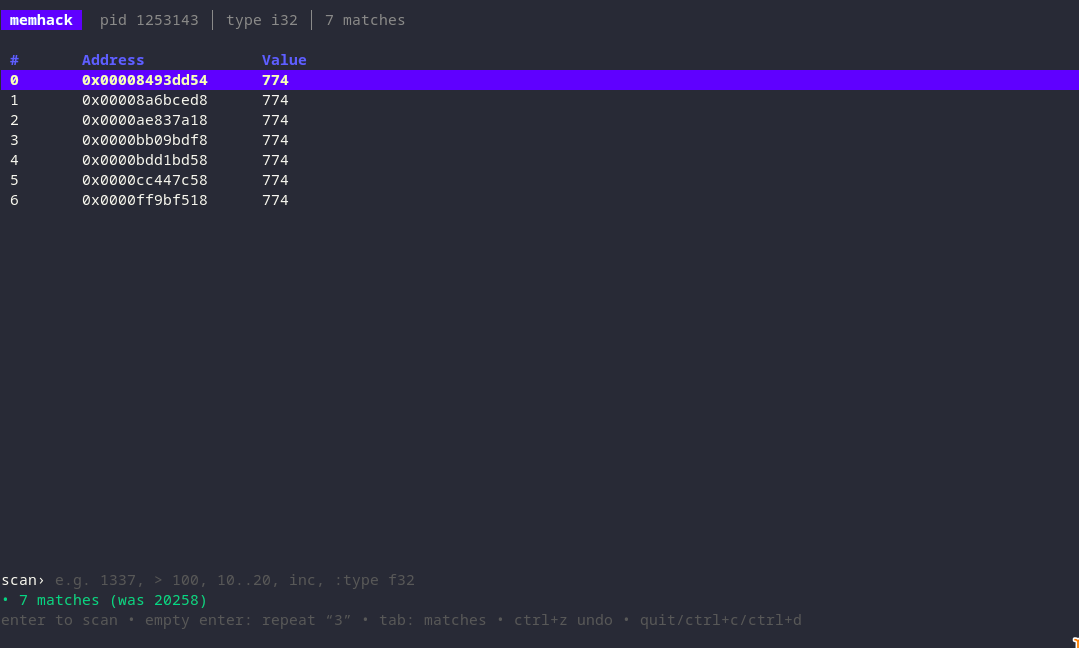
> 100, 10..20, changed, inc 5 and friends all do what you’d expect. That line-based repl is still there behind -repl, but the default is a Bubble Tea TUI, which adds the things you’d normally want a gui for: values refreshing live, editing a match in place, and freezing an address so it gets rewritten on an interval and holds against the program’s own writes.
The current feature set:
- Scans for integers (
i8–u64), floats (f32/f64), byte arrays (hex patterns) and strings - The usual operators: exact value,
><>=<=!=, ranges (10..20), and relative scans (changed,unchanged,inc,dec,inc 5, …) - Progressive narrowing with undo, so a mis-scan isn’t fatal
- Live-updating match values, which you can pause
- Editing values in place, and freezing an address to hold its value
- A searchable process picker for choosing a target (
/to filter) - Command history, cancellable scans (esc), and a configurable scan alignment to trade thoroughness for speed
- It only attaches around each operation, so it doesn’t leave the target paused while it sits idle
- The scriptable line-based repl (
-repl) alongside the TUI